TriChess — Welcome to the Hex
TriChess is chess, but the board bends, the pieces multiply, and three minds clash instead of two. Played on a hexagonal board with 169 cells, this is a reimagining of chess for the triangular age. Every piece has more power, every move has more options, and every game has an extra player to negotiate with — or against.
What Makes TriChess Different?
1. The Hexagonal Arena
Standard chess is 64 squares in a flat grid. TriChess is 169 hexagons arranged in a honeycomb. Instead of 4 orthogonal directions, pieces move in 6 axial directions — more space, more routes, more tactics.
2. More Moves, More Pieces
Every piece gets a boost on the hex board:
| Piece | Standard Chess | TriChess |
|---|---|---|
| Pawn attacks | 2 diagonals | 3 forward-diagonals |
| Knight moves | 8 L-shapes | 12 hex-L-shapes |
| Bishop directions | 4 | 6 (you get 3 bishops!) |
| Rook directions | 4 | 6 |
| Queen directions | 8 | 12 |
| King moves | 8 | 12 + castling |
| Starting pieces | 16 | 17 per player |
Each player starts with 17 pieces — that's 51 pieces on the board at the start. The extra bishop means bishops successfully cover every diagonal on the hex grid.
3. Three-Player Diplomacy
With three players, the game becomes social as well as strategic:
- Resignation voting: Players can vote to resign. But here's the twist — if just one player refuses to resign (votes "Decline"), they win instead. You can't force someone out unless they agree to go.
- Draw voting: All three must accept for a draw. One holdout keeps the game going.
- Proportional checkmate: When multiple players attack a king, the checkmate points are split proportionally by how many pieces each attacker contributed.
- Automatic endings: Stalemate (no legal move, but not in check) and threefold repetition end the game on their own — no vote needed.
4. Unique Scoring
- Win (checkmate): 2.0 points (split among attackers if multiple)
- Draw / Stalemate / Threefold repetition: 2/3 point each
- Resignation: The non-resigning player gets 2.0
- Rating: Multi-player Elo starting at 500
5. No Third Player? Bring a Bot
Can't find a 3rd human, or just want to practice? The game owner can seat one or two computer-controlled players (Bot 1 / Bot 2) into any empty seat and play solo or mixed human/bot games — see the Playing with Bots tab for details.
6. Two Ways to Play
Choose your board renderer in your profile:
- ondro — Built with Konva.js. Richer visuals, smooth animations, pinch-to-zoom, panning, scroll-wheel support on mobile, and the board updates live the instant another player or a bot moves.
- filio — Raw Canvas 2D. Lighter weight, snappy, but landscape, and you'll need to reload the page to see the other players' moves.
Both give you the same game — pick the one that feels right.
7. Make It Yours
- 6 themes: Default, Night, Sandy, Contrast, Colorblind, Black & White
- 3 piece sets: Default, Chubby, School
- Switch anytime in your profile settings
8. Colorblind-Friendly
The colorblind theme uses patterns and high-contrast colors so everyone can tell territories
and pieces apart.
Ready to Play?
- Register an account
- Head to Available to join an open game, create your own, or seat a bot into an empty seat if you own the game
- Choose your seat — Seat 1, 2, or 3
- Once all seats are filled (by humans and/or bots), the game starts automatically and appears on the Home page
- Click a piece, click a valid move, then hit Submit
The hexagonal revolution is waiting. See you on the board.
How to Play TriChess
This guide covers the user interface — how to navigate, interact with the board, and use the game controls. For the rules of TriChess (movement, checkmate, etc.), see the Rules tab. For playing against the computer, see the Playing with Bots tab.
Getting to a Game
| Action | How |
|---|---|
| Join a game | Go to Available, click Join on an empty seat |
| Create a game | Go to Available, pick a seat (1/2/3) in the Create a new game widget, and click Create |
| Fill a seat with a bot | Owner only — click Bot next to an empty seat on a game you created |
| Start playing | As soon as all 3 seats are filled, the game auto-starts and appears on the Home page. Click Play |
Board Layout
When you enter a game, the board shows your perspective:
- Your seat is at the bottom of the board
- Next seat is to the left
- Previous seat is to the right
Around the board you'll see:
- Player name panels — highlighted green when it's that player's turn, red when in check
- Eliminated pieces — captured pieces shown by type, sorted by value
- Power bars — proportional bar chart showing each player's remaining piece value
- Capture bars — how many opponent pieces each player has eliminated
- Info bar (bottom-left) — game ID, move number, and vote status
Making a Move
This game uses click-to-select, click-to-move interaction:
- Click a piece (one of your pieces, when it's your turn)
- The hex highlights with a selection border
- Coordinate axis hints appear through the hex — shows the q, r, s axes
- Valid destinations light up:
- Green circle = safe move (empty square)
- Red X = attack/capture
- Click a highlighted hex to move there
- If you click the same piece again, you deselect it
- If you click another one of your pieces, it switches selection
- If promoting (pawn reaches the opposite side), a popup appears:
- Choose Q (Queen), R (Rook), B (Bishop), or N (Knight)
- Click your choice — the move is completed
Submitting Your Move
Your move is local until you submit it. The game does not auto-submit:
- filio: Click the OK button below the canvas
- ondro: Click Submit in the right sidebar
After submission, the server validates your move and applies it. If another player submitted before you (race condition), you'll get a conflict warning — just reload and try again.
Live Board Updates
On the ondro renderer, your board refreshes automatically the moment another player — or a bot — makes a move or casts a vote, so you don't need to keep reloading the page to see what happened. The filio renderer doesn't have this yet — use Reload to check for updates.
Move History
You can browse the game history or even play the future without affecting the live game:
| Button | Action |
|---|---|
| Back / < | Go back one move (truncates local slog) |
| Forward / > | Go forward one move (re-applies from server slog) |
| Reload | Discard local changes and refetch from the server — the fallback if the board ever looks stale |
Voting
TriChess has two voting mechanisms. Voting blocks normal moves — you must resolve the vote before playing.
Draw Vote
- Click the Draw button (only on your turn, at the latest move)
- A modal shows all three players with Accept/Decline buttons
- As other players take their turns, they'll see the vote prompt
- Result: All 3 accept → draw (2/3 point each). Anyone declines → vote fails, game continues
Resignation Vote
- Click the Resign button (same conditions as Draw)
- Each player votes Accept or Decline
- Result: 2 accept, 1 declines → the declining player wins (2.0 points). Otherwise → vote fails
Strategic note: Resignation voting creates a prisoner's dilemma. If two players gang up on the third and vote to resign them, the third can simply decline and take the win. True resignation only happens when someone genuinely wants out.
Customization
In your Profile settings you can change:
| Setting | Options |
|---|---|
| Board renderer | ondro (Konva.js — richer, animated, touch-friendly, live updates) or filio
(Canvas 2D — lighter, simpler) |
| Theme | Default, Night, Sandy, Contrast, Colorblind, Black & White |
| Piece set | Default, Chubby, School |
Changes take effect immediately on your next board load.
Keyboard & Quick Tips
- No keyboard shortcuts currently — all interaction is click/tap based
- Theme and pieces are per-user, not per-game — your settings follow you
- If the board looks wrong or you suspect a stale state, use Reload
- Your JWT session lasts 1 hour; the page auto-refreshes if the token expires
Playing with Bots
Don't have two other players handy? Want to practice a new opening or just try out the hex board on your own terms? Any game owner can seat a computer-controlled opponent into an empty seat.
Seating a Bot
- Create a game from the Available page (you become its owner)
- Next to each empty seat in your own game's row, click Bot instead of waiting for Join
- Each bot seat gets a distinct account — Bot 1 and Bot 2 — so a game can have up to two bot-controlled seats without any ambiguity about whose move is whose
- Once all 3 seats are filled (by any mix of humans and bots), the game starts automatically
Only the game's owner can seat a bot — this keeps someone else's open game from being filled with a bot against their wishes.
How Bots Play
- Bots follow exactly the same rules as human players — same legal moves, same checkmate/stalemate conditions, and they can be checkmated just like anyone else.
- Bots can also cast draw and resignation votes when it's their turn to respond.
- Early in the game, bots often reply almost instantly using a book of common opening moves. Later on, a bot calculates its move by searching ahead — this can take up to roughly 30 seconds on tougher middlegame positions, so don't worry if a bot doesn't respond immediately.
- A bot's move is computed in the background — you don't need to do anything to trigger it, and (on the ondro renderer) your board updates live the moment it responds.
Casual, Not Competitive
Any game with at least one bot seat is casual:
- No effect on any player's rating
- Not counted in the leaderboard on the Ratings page
- Not counted toward your win/loss/score statistics on your Profile page
Bot games are purely for fun and practice — play as many as you like without any impact on your standing.
Notifications in Bot Games
If you're the only human in a game (facing both Bot 1 and Bot 2), you generally won't receive live "it's your turn" or "game over" push notifications — you're presumably already at the board, so these are switched off by default for solo games. If you do walk away and forget about the game, you'll still get a reminder notification after about 24 hours of inactivity, just like any other game.
If your game has two humans and one bot, notifications work exactly as normal — the bot seat doesn't change anything for the human players.
Why Play a Bot?
- Learn the hexagonal board and piece movement without waiting for other players
- Try out an opening or tactic before using it in a rated game
- Fill an empty seat when a 3rd human isn't available so the other two can still play
Phone notifications
During a game, players can receive a push notification whenever it becomes their turn to move, or when a game ends. To enable these notifications on your phone, you need to install the ntfy app. (Playing solo against two bots? See the Playing with Bots tab — that case is handled a bit differently.)
1. Install the ntfy app
Download and install the ntfy application from your app store (available on both Android and iOS).



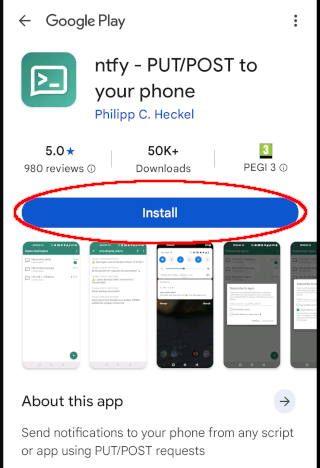
2. Click on the install button.
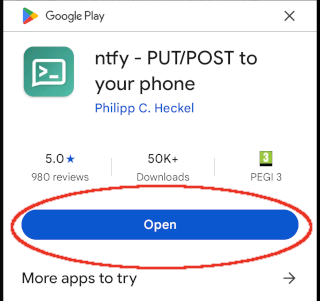
3. Open the application. Click on the open button.
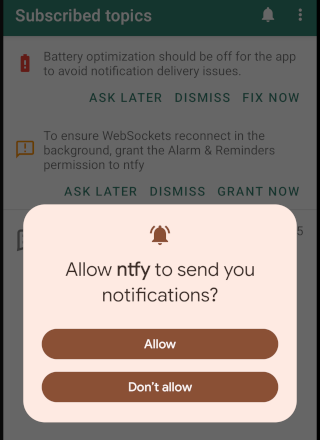
4. Click on the allow button.
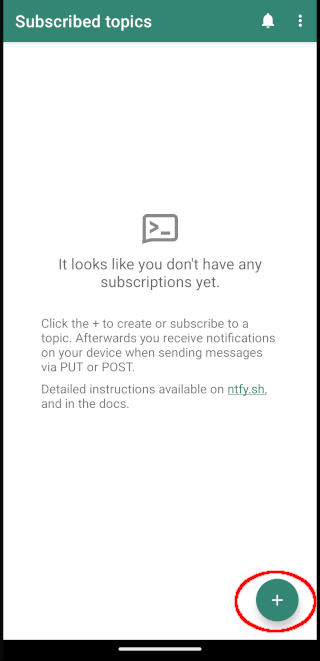
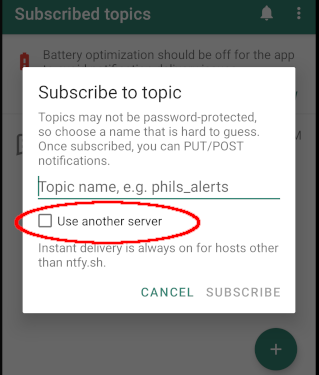
5. Click on the plus button to subscribe.
6. Tick use another server and provide service URL.
Set server to: https://ntfy.mykuna.eu
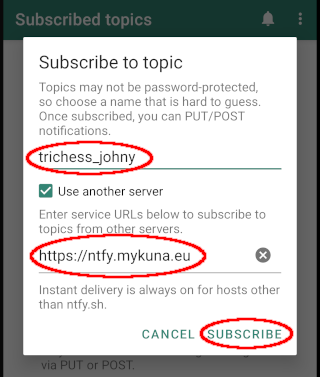
7. Provide topic name
Set topic name in format: trichess_username, where username is your actual Trichess
username.
For example, if your username is johny, the topic would be: trichess_johny.
Click SUBSCRIBE
8. All done!

Now you will automatically receive a notification on your phone whenever it's your turn in Trichess.

Trichess rules
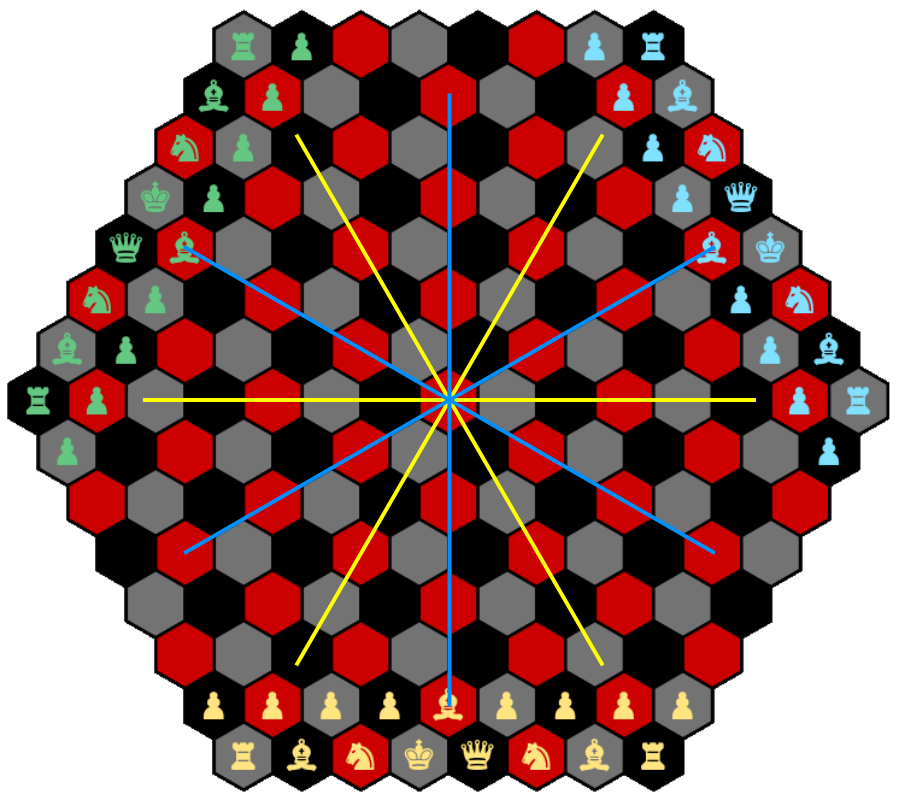
Trichess is a three-player variation of chess played on a hexagonal board. The board has three colors, which define the diagonals (blue lines), while straight lines (yellow lines) run across the flat sides of the hexagons. Because of the three-colored design, each player begins with three bishops instead of two. These rules apply identically whether you're facing human opponents, a bot, or a mix of both.
Play
At the start of the game, Player 1 always makes the first move, and turns rotate clockwise among the three players. On each turn, a player may move only one piece, with the sole exception of castling, which involves moving both the king and rook together.
Capturing follows the standard principle: a player removes an opponent's piece by moving onto its square. A player may not move through or capture their own pieces. Pawns are the only exception to the general rule of moving and capturing in the same way, as pawns move forward but capture diagonally forward.
Turns
In Trichess, all pieces move as in traditional chess, adapted to the hexagonal board's straight and diagonal directions.
Pawns move one space forward at a time, but on their very first move they may advance two spaces. Captures are made diagonally forward (see A symbols on figure). If a pawn reaches the one of the opponent side of the board, it is promoted to a stronger piece of the player's choice, except for the king. Any number of pawns can be promoted during the game.
Note: The en passant capture, which normally allows a pawn to capture an enemy pawn that has advanced two spaces, is not yet implemented in Trichess.
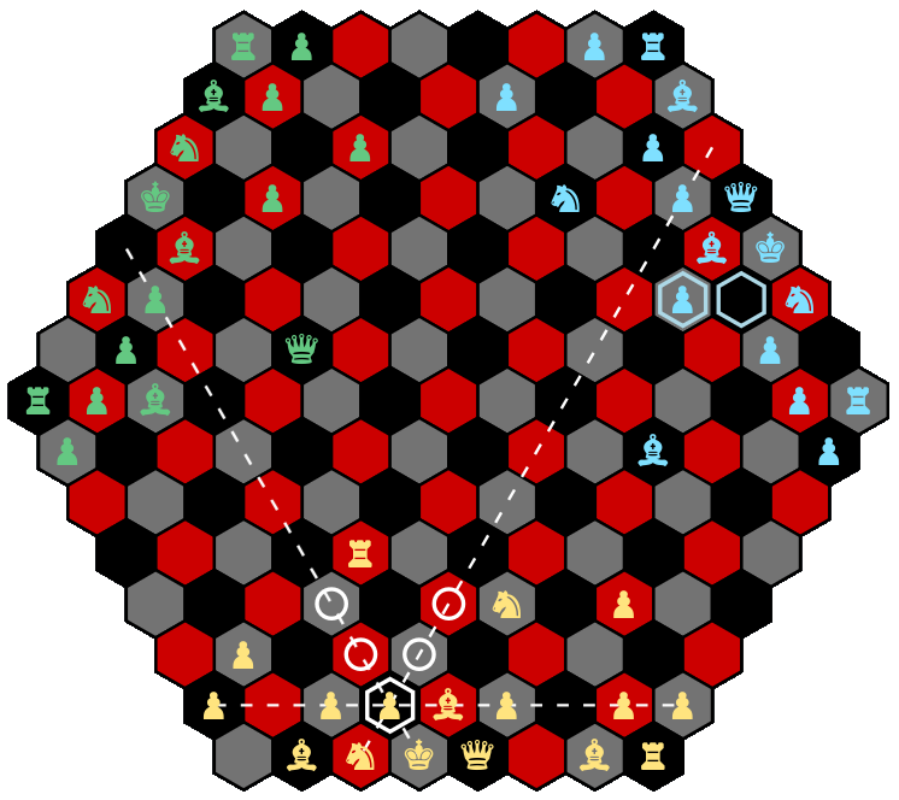
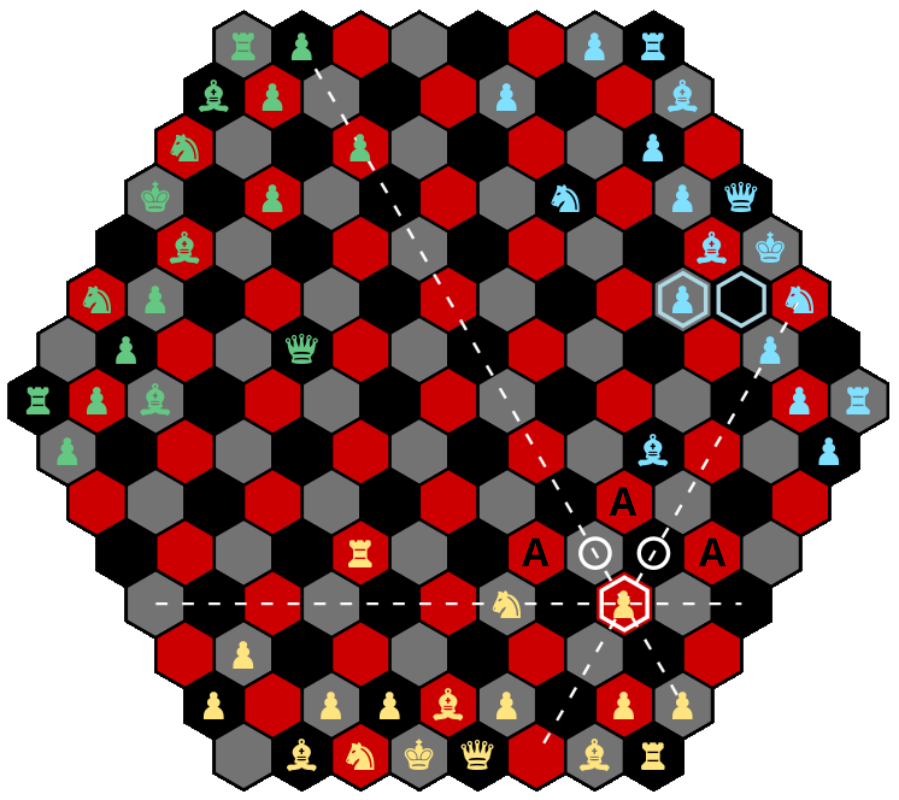
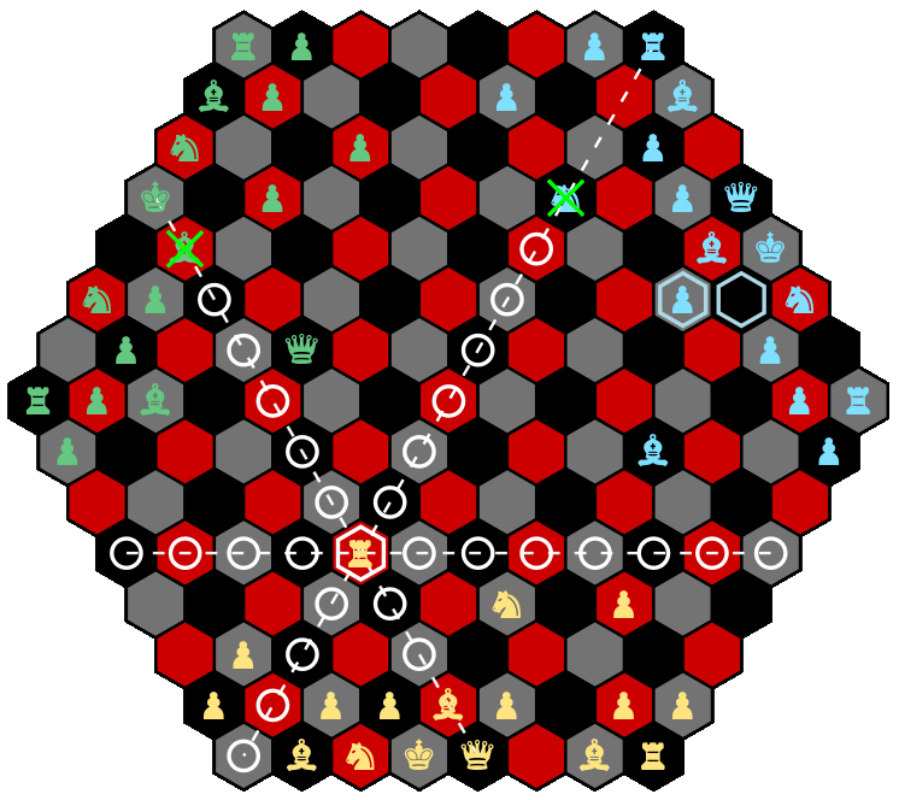
Rooks move any number of spaces in straight lines, whether forward, backward, or sideways.
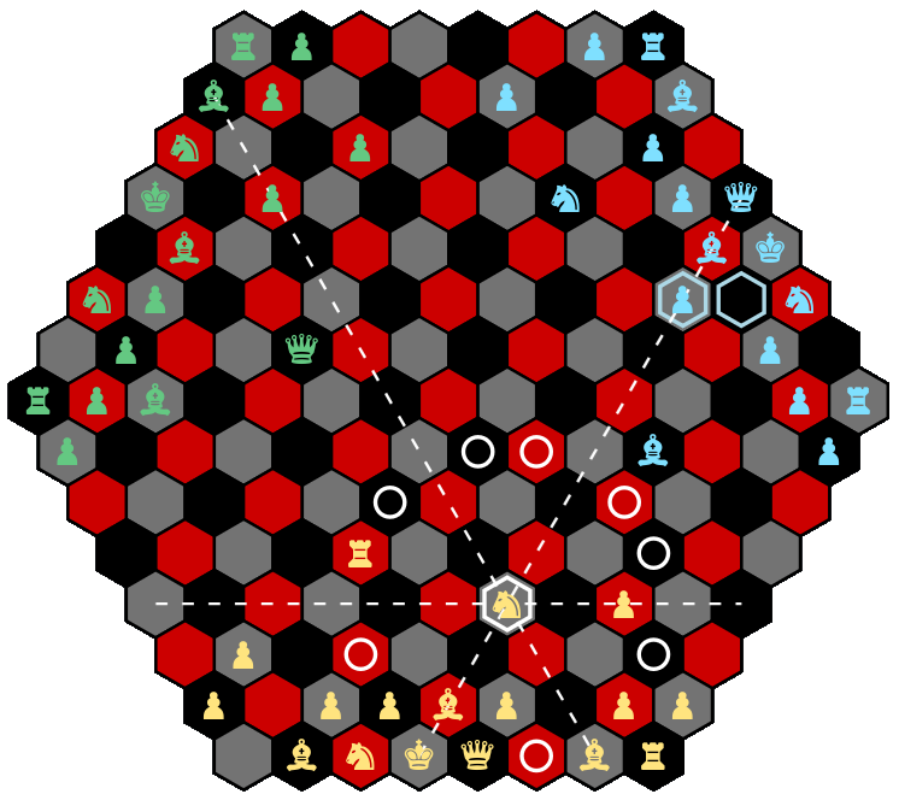
Knights are unique in that they jump over intervening pieces. A knight's movement follows an L-shape: two spaces in one direction, either forward, backward, or sideways, followed by a one-space turn left or right.
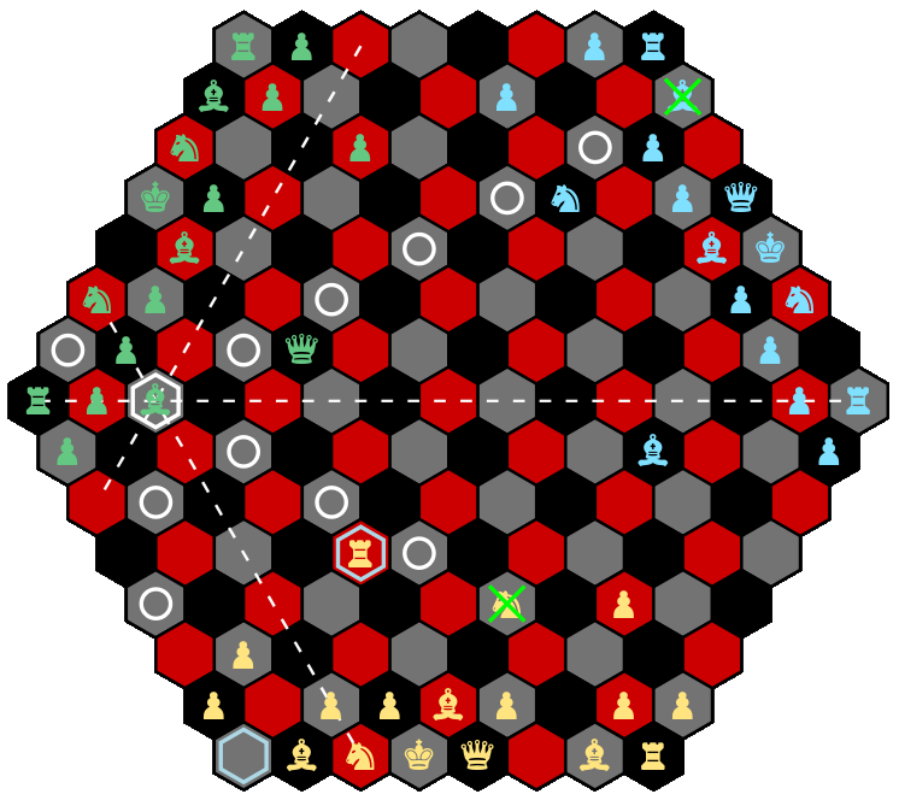
Bishops move any number of spaces along diagonals.
Queens combine the powers of rook and bishop, moving any number of spaces in straight or diagonal directions.
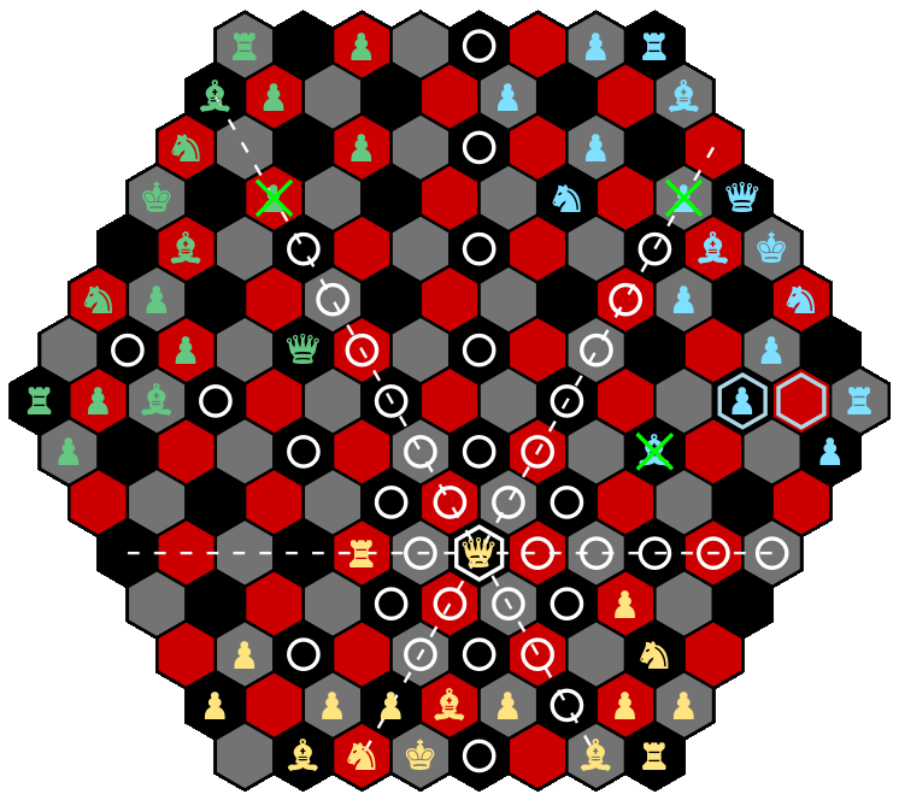
The king moves only one space at a time in any direction, but may never move into a square that is under attack.
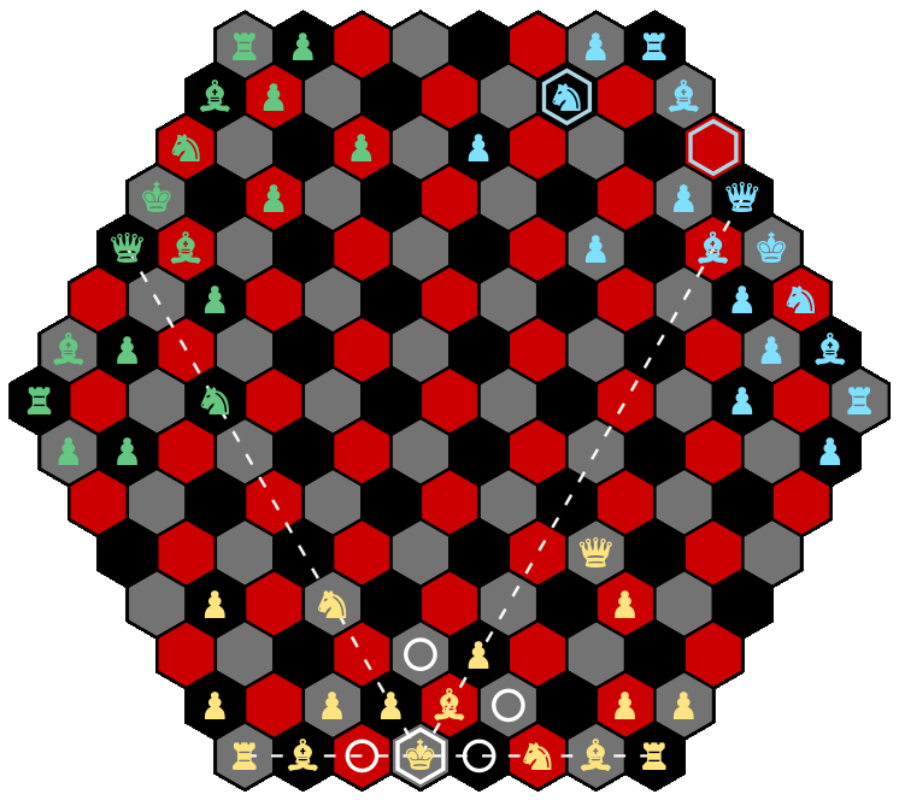
Castling is the only move in which two pieces may move simultaneously. To castle, the king moves two spaces toward a rook, and the rook jumps over the king to land on the other side. Castling is permitted only if the king has not previously moved, the rook has not moved, no pieces stand between them, and the king is not in check, does not pass through a checked square, and does not land in check. It does not matter if the king was in check earlier in the game, or if the rook itself is under attack before castling.
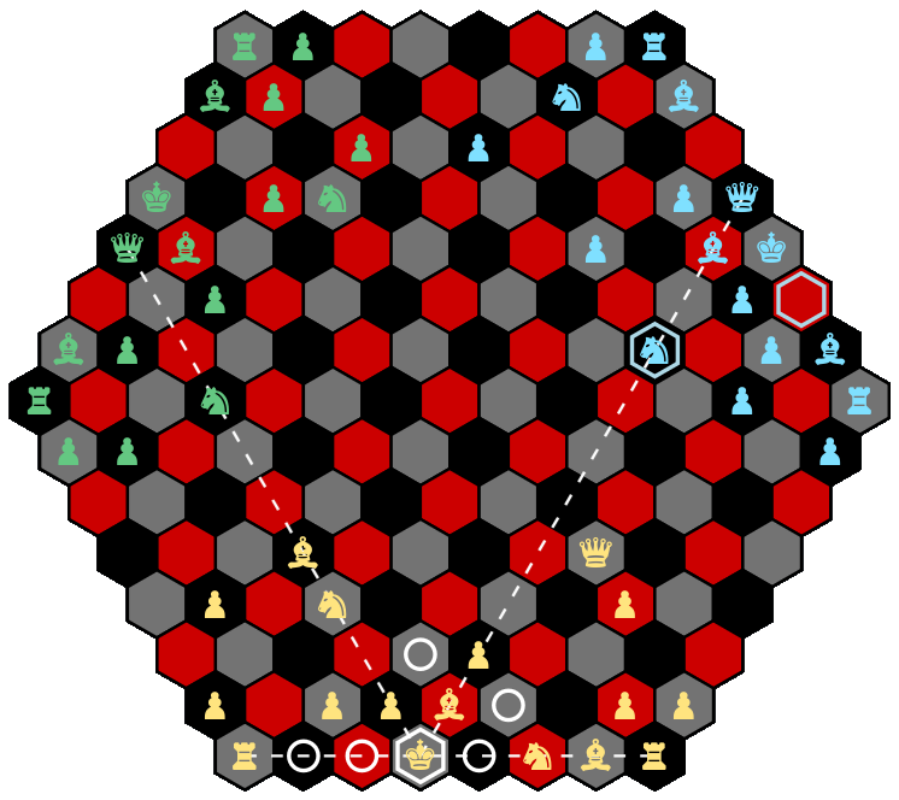
Check
A king is considered in check when an opposing piece threatens to capture it on the opponent's next turn. When in check, a player must respond by moving the king out of check, capturing the attacking piece, or placing another piece in the way to block the attack. A king may never move into a position where it would be in check.
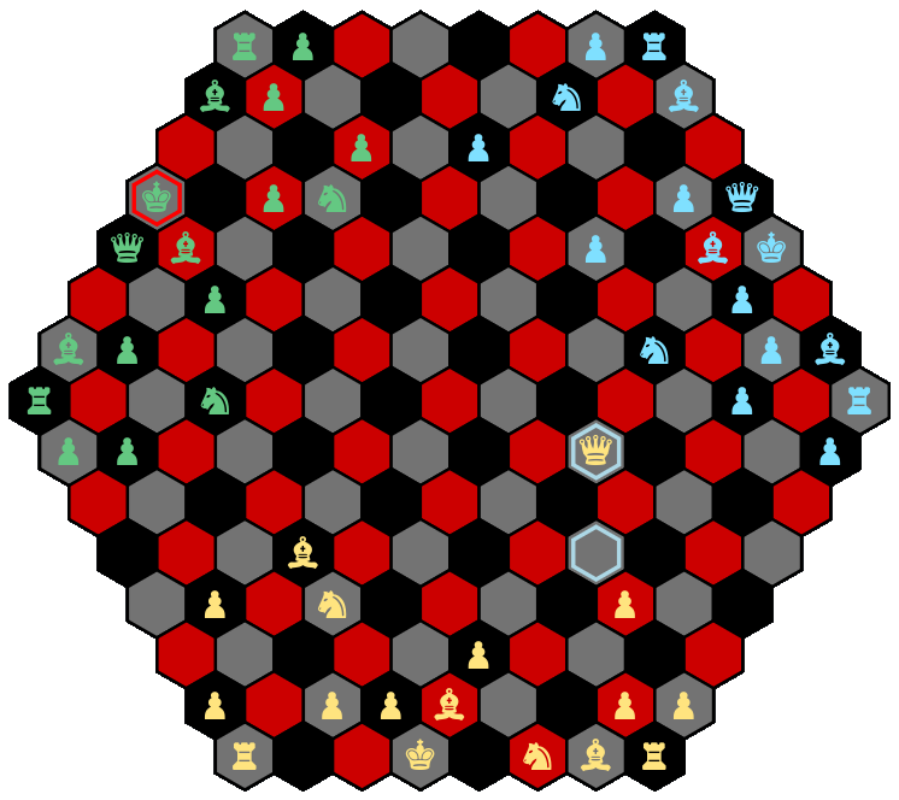
Checkmate
Putting an opponent's king in checkmate is the only way to win the game.
Checkmate occurs when a king is in check and cannot escape. In this case, the attacking players earn two points total, split according to how many of their pieces contribute to the checkmate. For example, if one player delivers the checkmate, they earn two points, while if two players' pieces both contribute to the checkmate, each receives one point.
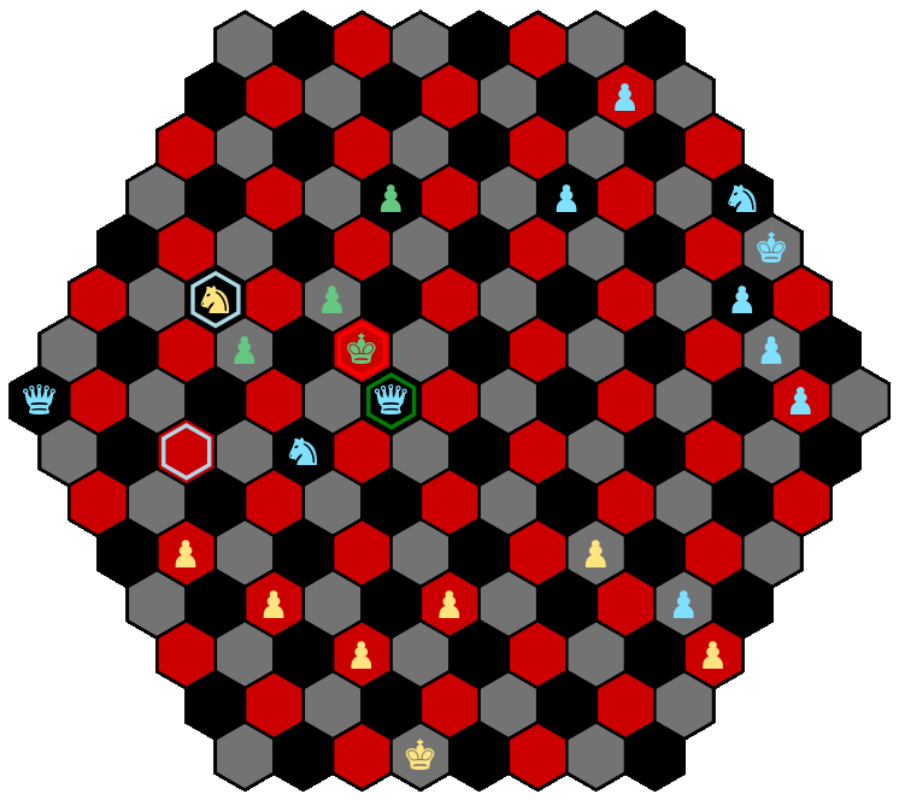
In the illustration, the blue queen and yellow knight have the green king in check, and all the spaces where the king can move can be attacked by the queen or knight. The king cannot take the queen, because the other queen is protecting the queen. This is checkmate and 2 points are shared between blue and yellow players according to the number of their pieces giving check. So 1 point for blue (blue queen) and 1 point for yellow (yellow knight).
If a player had another piece somewhere on the board that is not blocked, it would have to move. The game would continue.
Stalemate, Draws, and Repetition
Not every game ends in checkmate. Trichess recognizes four other ways a game can end, all sharing the same 2/3-point-each split (except resignation):
- Stalemate: The player on move has no legal move anywhere on the board, but their king is not in check. Unlike checkmate, this ends the game immediately and automatically — 2/3 point for each of the three players.
- Threefold repetition: If the exact same position — same pieces on the same squares, same player to move, and the same castling/pawn-double-step rights — occurs three times over the course of the game, the game ends automatically in a draw, 2/3 point each. No one needs to claim it; the server detects it as soon as the third occurrence happens.
- Draw vote: All three players accept a draw — 2/3 point each. See the How to Play tab for how voting works.
- Resignation vote: Two players accept resignation and one declines — the declining player wins outright (2.0 points). See the How to Play tab.
Stalemate and threefold repetition require no action from any player — the server checks for both after every move and ends the game the instant either condition is met.
Basic Strategy
Trichess is an incredibly complex strategic game, and it is impossible to go into all the possible tactics one could use to win. Here are some hints for new players.
As in traditional chess, pieces in Trichess have relative values that help guide strategy. Queens are worth nine points, rooks five, bishops and knights three each, and pawns one. However, pawns become more valuable as they approach promotion. Because pawn promotion is such a powerful opportunity, it is almost always best to promote a pawn into a queen.
Effective play in Trichess requires both strong offense and solid defense. Players should try to maintain balance across the board, keeping their forces spread out to control key areas. Attacks are most successful when supported by multiple pieces, as lone pieces are easily cut off and captured. At the same time, players must guard their king carefully while also preparing to exploit weaknesses in the defenses of their two opponents.
The ultimate objective of Trichess is to checkmate an opponent's king. Once checkmate is achieved, the winning players are awarded points according to pieces involved in checkmate.
Enjoy the game.
Privacy & Cookies
What we store to run the game
Your account (username, email, hashed password, preferences), your games and ratings, and a server log of game events. A session cookie keeps you logged in. These are required for Trichess to work.
Analytics (optional)
With your consent, we use Google Analytics to see how visitors find and use the site — which pages are visited, and account/lobby actions such as signing up, logging in, or creating and joining games. It is never loaded before you click Accept.
- No usernames or email addresses are sent; logged-in visitors are identified only by an anonymous, one-way hashed id.
- Moves and in-game actions are not sent to Google.
- Advertising features and Google signals are turned off.
- Password-reset and verification links are masked before anything is sent.
You can change your choice at any time via Cookie settings in the page footer. Rejecting after accepting removes the Google Analytics cookies from your browser.